
Text Neck in Remote Workers: A Desk-Setup Guide

If you work from home, there's a good chance your neck is paying for it. Text neck — the forward-head posture that comes from hours spent looking down at a phone or hunched toward a laptop screen — isn't unique to remote workers, but the way most people set up a home office tends to make it worse, not better. There's no single fix that resolves text neck for everyone. How much it affects you, and what actually helps, depends on your posture patterns, your workspace, and what an evaluation shows about your neck and nervous system. This guide walks through the desk-setup changes that matter most, and when it's worth getting a professional look at what's going on.
What Is Text Neck, Really?
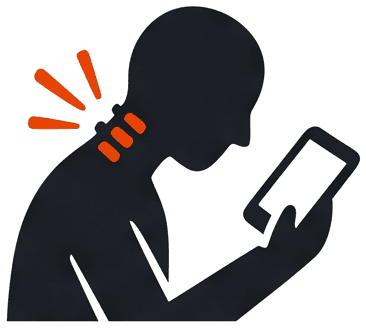
Text neck describes the strain that builds in your neck and upper back when your head sits forward of your shoulders for long stretches — the posture almost everyone falls into while looking down at a phone, tablet, or laptop screen. Your head is heavy, and your neck muscles are built to support it when it's stacked over your shoulders. The farther forward your head tips, the harder those muscles and the joints in your cervical spine have to work to hold it up. Do that for a few hours a day, every day, and the strain adds up — first as tightness and fatigue, later as neck pain, headaches, or stiffness that doesn't fully resolve overnight. It's common enough that it's earned its own name — tech neck — and remote work tends to make the pattern more constant, not less.
Why Remote Work Makes It Worse
An office desk isn't perfect, but it usually comes with some baseline ergonomics — a monitor at a fixed height, a real chair, a keyboard that isn't attached to the screen. Remote work strips a lot of that away. A few patterns show up often:
- Laptops force your head down. Built-in screens sit low and close, which pulls your head forward and down for hours at a stretch.
- Video calls add a new posture trap. Staring at a small window of your own face on camera tends to pull your chin down and your shoulders in.
- "Office" often means couch, bed, or kitchen table. None of these support a neutral neck position the way a proper desk setup does.
- Less incidental movement. No walk to a coworker's desk or a conference room means fewer natural breaks from sitting still.
- Phone use fills the gaps. Texts, calls, and scrolling between meetings add up on top of the screen time you're already logging.
We see this pattern often here in Lakewood Ranch, Sarasota, and Bradenton, where more of the local workforce has shifted to hybrid or fully remote schedules in recent years — often working from a kitchen table or spare bedroom rather than a proper home office. None of this means remote work is inherently bad for your neck. It means the setup around it usually needs more intention than an office environment naturally provides.
Signs Your Setup Needs an Upgrade
A few patterns tend to show up before text neck becomes a bigger problem:
- Neck or upper-back stiffness that's worse at the end of the workday
- Tension headaches that start at the base of the skull
- Shoulders that creep up toward your ears without you noticing
- Tingling, heaviness, or aching that runs into your shoulders or arms
- A visibly forward head position in photos or a mirror check
If any of this sounds familiar, it's worth looking at your workspace before assuming it's just "how your neck feels now."
The Desk-Setup Changes That Matter Most
You don't need an expensive overhaul to make a real difference. A few changes tend to have the biggest impact:
- Raise your screen. The top of your monitor (or laptop, with a stand) should sit roughly at eye level, so your gaze falls slightly downward instead of your whole head tipping forward.
- Get your laptop off your lap. A laptop stand plus an external keyboard and mouse lets you raise the screen without cramping your hands.
- Support your lower back. A chair with real lumbar support — or a rolled towel in a pinch — makes it easier to keep your upper body stacked over your hips instead of slouching forward.
- Keep the screen at arm's length. Too close, and you'll naturally crane forward to see it clearly.
- Rethink your phone habits. Hold your phone up near eye level for calls and texts instead of tilting your head down, and use speaker or headphones when you can.
- Build in posture breaks. Set a reminder to stand, reset your position, and move every 30–45 minutes. Your neck was never meant to hold one position all day.
Beyond the Desk: Everyday Habits Worth Building In
Your desk setup matters, but it's not the only piece. A few simple habits are commonly discussed as supportive alongside a better workspace:
- Chin tucks. Gently draw your chin straight back (not down) to briefly reset your head position over your shoulders.
- Shoulder rolls. Slow, deliberate rolls can help ease the tension that builds from hours of stillness.
- A short walk between meetings. Even five minutes away from the screen gives your neck a break from a fixed position.
- A supportive pillow at night. If your neck feels tight every morning, what's happening while you sleep may be part of the picture too.
These habits don't replace a proper evaluation, but they're reasonable, low-risk things to build into a remote workday.
When Desk Changes Aren't Enough
For a lot of people, a better setup and a few new habits meaningfully ease day-to-day tension. For others, the discomfort keeps coming back no matter how carefully the workstation is arranged — which usually means there's more going on in the neck and upper spine than posture habits alone can explain. That's where a proper evaluation comes in. At The Roots Health Centers, we start with a full neurological evaluation and any necessary X-rays to understand what's actually happening in your cervical spine, not just how you're sitting. From there, chiropractic care using Torque Release Technique — a gentle, low-force approach — may be part of a personalized plan to support your neck. Every person's pattern is different, so how often you're seen and what your plan looks like depends entirely on what your evaluation shows. We don't hand out a generic protocol; we build a plan around your body. For a deeper look at posture-driven strain in general, see our related guide on tech neck.
Frequently Asked Questions
Can text neck be reversed? Many people notice real improvement in comfort and posture once the underlying strain is addressed — through a better setup, consistent habits, and, when needed, care that supports the neck itself. How much changes and how quickly varies by person, so we don't promise a specific outcome or timeline.
What's the best monitor height to prevent text neck? As a general guide, the top of your screen should sit roughly at eye level so your neck stays close to neutral instead of tipping forward. A laptop riser or monitor arm makes this easier to achieve than propping books under a laptop.
Does text neck cause headaches? It can contribute to them. Sustained forward-head posture puts extra strain on the muscles at the base of the skull, which is a common driver of tension-type headaches in people who spend long hours at a screen.
How often should I take breaks to prevent text neck at a desk? A reasonable starting point is standing up and resetting your posture every 30 to 45 minutes. The frequency that works best for you may be different — it depends on your setup, your workload, and how your neck responds.
Is text neck the same as a pinched nerve or a bulging disc? Not necessarily. Text neck describes a posture-driven pattern of strain, while a pinched nerve or disc issue involves a specific structural change. The two can overlap, which is one reason a proper evaluation matters if your symptoms include tingling, numbness, or pain that radiates into your arm.
If your neck hasn't felt right since you started working from home, schedule a complimentary consultation at The Roots Health Centers in Lakewood Ranch, FL, or call (941) 877-1507. We'll walk you through a full neurological evaluation and help you understand what's actually going on in your neck.
The Roots Health Centers, 8209 Natures Way, Unit 115, Lakewood Ranch, FL 34202.
Conditions We Treat

Neck Pain
Precise cervical adjustments and decompression that restore alignment, reduce nerve pressure, and eliminate chronic neck pain at its source.
Tech Neck
Forward head posture from daily screen use shifts the mechanical load on your cervical spine, compresses nerves, and drives chronic neck pain, headaches, and upper back tension. Corrective care addresses the structural change — not just the symptoms.